
Here you'll find our guidelines to get optimum quality from your artwork files when you print with us at Paramount Labels.
Artwork that is not supplied using the following criteria may require design work that will incur additional costs. Which our estimating, production and studio team will advise for all required amendments before proceeding...
File Formats:
All files should be supplied print ready as a high resolution vector .PDF, with all text converted to outlines.
File types such as .eps, .tiff or .jpeg should be at least 300dpi when placed/viewed at 100%.
Please do not convert a lower resolution file to 300dpi as this will NOT improve the image.
Please also note we will not able to change or edit Photoshop (.PSD) files unless they are layered with all used fonts supplied.
Illustrator .eps files should have all “type” outlined and images should be embedded.
PDF’s should have the fonts and images embedded.
If “type” is not outlined or text change are required, we will need the font supplied in a file.
Cutter guides, foil, varnishes and white should be on separate layers as a ‘Spot’ colour.
Please ensure artwork is intact under the cutter guide and also supply the cutter Keyline as ‘Stroke’ and not ‘Fill’.
Colour Mode Of Files Supplied:
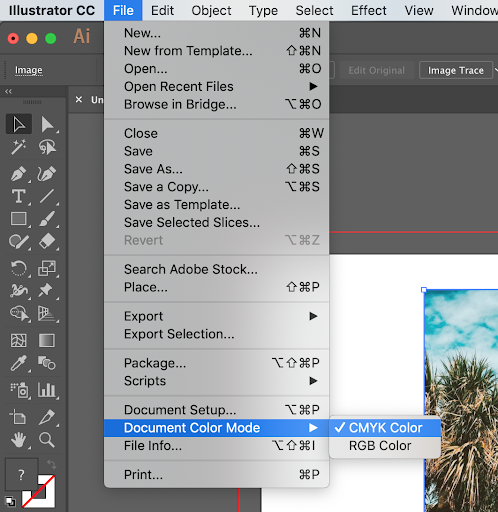
If printed digitally, all files should be supplied using CMYK colour mode and not RGB.
Pantone references should be supplied on the file when flexographically printed.
Artwork using black should be supplied as “100 % Black”.
Registration should not be used as a colour or 0% for White. It should be used for crop, trim, registration only.
Colour consistency should be maintained across label ranges.
If there is a colour change then please inform us when you submit your artwork.
Please ensure that the artwork dimensions are set for the size it is to be printed.
PDF files should contain vector graphics to allow us to edit to add trapping and separate colours.
Please note:
Digital Printing is very detailed and will pick up slight issues in the files, so it is imperative that artwork is to a high standard.
Bleed & Quiet Zones:
Bleed is the area that prints beyond the trim marks or cutter guide of a label.
The bleed should be at least 3mm extra all around the relevant design’s cutter outline to avoid misprinted edges.
Quiet zones are the areas inside of the trim marks where nothing critical is being printed. There should be at least a 2mm border of non-critical print all the way around.
Crop and printers marks are not essential but we do ask for a correctly sized cutter outline placed for our reference and a streamlined proofing process.
Failing to meet the above artwork criteria may result in artwork being rejected to due non-compatibility or cause delays on project deadlines.
Please note that we can only proof and correct artworks in British English. For any amendments in other languages (including special characters and alphabets) please consult a specialist.
Please contact our team if you would like any further information about our studio capabilities.